Image processing
Affine transformations
An affine transformation maps point \((x, y)\) to \((x', y')\) via matrix multiplication:
Translation, scaling, rotation, and shearing are all special cases of the six-parameter matrix \(\begin{bmatrix} a & b & t_x \\ c & d & t_y \end{bmatrix}\) — “affine” means linear plus a constant shift.
Interactive affine demo
Select a transformation type and adjust the sliders to see how affine transformations modify a rectangle. The transformation matrix updates in real time.
Key properties preserved: parallel lines remain parallel, ratios along the same line are preserved, midpoints are preserved. Not preserved: angles change (except rotation), distances change (except rotation and translation).
Convolution
1D convolution
Convolution slides a small kernel across a signal, multiplying and summing at each position. Press Play to watch the kernel traverse the signal step by step. Try different signal and kernel presets to see how convolution performs smoothing (Box), edge detection (Edge), and differentiation (Derivative).
2D convolution
In 2D, the kernel slides over an image in both directions. Each output pixel is the weighted sum of a small neighborhood. Press Play to watch the kernel scan across the image. Try different kernels to see blur, sharpen, and edge detection in action.
Image alignment
Template matching
- What is template matching?
Template matching locates a small reference image (template) within a larger image by computing similarity at each position.
- Why use template matching in electron microscopy?
Drift correction: During long acquisitions, thermal expansion, mechanical vibrations, and stage instabilities cause specimen shifts between frames. Template matching tracks a distinctive feature (atomic column, nanoparticle, or edge) across frames to measure displacement.
Two correction approaches:
Post-acquisition: Measure drift vectors and computationally realign frames
Real-time feedback: Actively adjust stage position during acquisition
Without drift correction, multi-frame averaging blurs atomic features.
- How does template matching work?
For a 512×512 image and 10×10 template:
Place template at position \((x, y)\)
Compute similarity score between template and image region
Slide template to next position
Repeat for all ~250,000 positions
Similarity map peaks indicate template locations
Cross-correlation
- How is cross-correlation used in template matching?
Cross-correlation computes the similarity score at each position by multiplying corresponding pixels and summing results.
- What is cross-correlation?
Cross-correlation uses two coordinate systems:
Global coordinates \((x,y)\): Template position in the large image
Local coordinates \((u,v)\): Pixel indices within the template
For a template of size \(M \times N\), the cross-correlation at position \((x,y)\) is:
\[C(x,y) = \sum_{u=0}^{M-1} \sum_{v=0}^{N-1} T(u,v) \cdot I(x+u, y+v)\]Example: Template \(\begin{bmatrix} 100 & 150 \\ 120 & 180 \end{bmatrix}\) with image region \(\begin{bmatrix} 95 & 145 \\ 125 & 175 \end{bmatrix}\):
\[C = (100)(95) + (150)(145) + (120)(125) + (180)(175) = 77{,}750\]- Why does higher cross-correlation mean better match?
When bright pixels align with bright pixels and dark with dark, each multiplication produces a large positive number. High sum indicates similarity.
- What is the problem with raw cross-correlation?
Brightness variations dominate the score. A featureless bright region can outscore a perfect pattern match in a darker area.
Example: Template [10, 20, 30]
Match against itself: \(C = 10^2 + 20^2 + 30^2 = 1400\)
Match against bright patch [100, 100, 100]: \(C = 10(100) + 20(100) + 30(100) = 6000\)
The uniform brightness wins by 4×, despite capturing none of the pattern.
- Why use normalized cross-correlation?
Normalized cross-correlation (NCC) measures pattern shape rather than absolute brightness by subtracting means and dividing by standard deviations:
\[\text{NCC}(x,y) = \frac{\sum_{u,v} [T(u,v) - \bar{T}][I(x+u,y+v) - \bar{I}]}{\sqrt{\sum_{u,v}[T(u,v) - \bar{T}]^2 \sum_{u,v}[I(x+u,y+v) - \bar{I}]^2}}\]where \(\bar{T}\) is the template’s mean intensity and \(\bar{I}\) is the image region’s mean.
Output range: -1 (inverted pattern) to +1 (perfect match)
Robust to:
Lighting changes
Contrast variations
Detector gain differences
Interactive cross-correlation demo
Adjust the shift sliders to move the image, then see the cross-correlation map update in real time. The bright peak in the correlation map reveals the shift between the two images.
Fourier-based alignment
- What is Fourier-based alignment?
Fourier-based alignment detects image shifts by working in frequency space. The Fourier shift theorem states: translation in real space becomes a phase shift in frequency space.
- Why is this important for beam tilt correction?
In beam tilt corrected STEM (tcBF-STEM), each detector pixel corresponds to a different beam tilt angle. By reciprocity, this creates multiple shifted views of the same sample. Fourier-based alignment provides the speed and accuracy needed to align thousands of these shifted images.
- How does the Fourier shift theorem work?
Translating an image by \((\Delta x, \Delta y)\) multiplies its Fourier transform by a phase factor:
\[\mathcal{F}\{f(x - \Delta x, y - \Delta y)\} = e^{-2\pi i(k_x \Delta x + k_y \Delta y)} \mathcal{F}\{f(x,y)\}\]where \(k_x\) and \(k_y\) are spatial frequencies. The magnitude remains unchanged—only the phase shifts.
- How do you apply the Fourier shift theorem?
To shift an image by \((\Delta x, \Delta y) = (2.5, 1.3)\) pixels:
Compute FFT: Call
np.fft.fft2()to get complex array \(F[i,j] = a + bi\)Calculate phase shift for each frequency \((k_x, k_y)\):
\[\theta = -2\pi(k_x \Delta x + k_y \Delta y)\]At frequency (0.1, 0.2):
\[\theta = -2\pi(0.1 \times 2.5 + 0.2 \times 1.3) = -3.20 \text{ rad}\]Convert to complex number:
\[e^{i\theta} = \cos(-3.20) + i\sin(-3.20) = -0.9899 - 0.1411i\]Multiply Fourier coefficient: For \(F[i,j] = 3.62 + 3.73i\):
\[(3.62 + 3.73i)(-0.9899 - 0.1411i) = -3.057 - 4.203i\]Verify magnitude preservation:
Before: \(\sqrt{3.62^2 + 3.73^2} = 5.20\)
After: \(\sqrt{3.057^2 + 4.203^2} = 5.20\) ✓
Inverse FFT:
np.fft.ifft2()reconstructs the shifted image
Repeat for all 262,144 elements (512×512 image). The shift never moves pixels directly—it modifies phases in frequency space.
- What is the computational cost of real-space shifting?
For a 1024×1024 image with known shift:
Integer shifts (e.g., exactly 10 pixels):
Copy each pixel to new position: ~1 million operations
Sub-pixel shifts (e.g., 10.5 pixels):
Requires interpolation between neighboring pixels
Linear interpolation: 4 operations per pixel
Bicubic interpolation: 10 operations per pixel
Total: ~10 million operations
- How does Fourier shifting compare?
Computational cost:
Two FFTs + phase multiplication: ~21 million operations
Independent of shift amount
When real-space wins:
Integer shifts: 1M operations (21× faster than Fourier)
Sub-pixel shifts: 10M operations (2× faster than Fourier)
Fourier advantages:
Simpler implementation (no coordinate transformation logic)
No edge handling required
Sub-pixel precision natural from phase
Both methods produce equivalent quality
- Why use Fourier-based shifts for unknown shifts?
The advantage emerges when measuring drift between two images where the shift amount is unknown.
Brute force real-space search:
Testing all possible integer shifts from -50 to +50 pixels in both directions:
Shift candidates: 101 × 101 = 10,201 positions
Each trial: shift image (~1M ops) + compute similarity (~1M ops) = 2M ops
Total: ~20 billion operations
Phase correlation in Fourier space:
Three FFTs: ~31 million operations
Produces 2D map where peak directly reveals shift
All 10,000+ candidates evaluated simultaneously
Speedup: 600×
Sub-pixel precision comparison:
Real-space with 10 sub-pixel positions per integer shift:
Search space: 1,010 × 1,010 = 1,020,100 positions
Each sub-pixel shift requires interpolation (~10M ops)
Total: ~10 trillion operations
Fourier phase correlation:
Coarse shift: 31M operations
Sub-pixel refinement: ~1M operations
Speedup: 30,000×
Phase correlation in Fourier space
- What is phase correlation?
Phase correlation finds the shift between two images by comparing phases in frequency space.
Given reference image \(I_1\) and shifted image \(I_2\):
Compute Fourier transforms \(F_1\) and \(F_2\)
Calculate cross-power spectrum:
\[R = \frac{F_1 \cdot F_2^*}{|F_1 \cdot F_2^*|}\]Inverse Fourier transform of \(R\) produces a sharp peak at \((\Delta x, \Delta y)\)
The peak position directly reveals the shift.
- How does this differ from template matching?
Template matching:
Scans every position
Complexity: \(O(N^2M^2)\) for \(N \times N\) image and \(M \times M\) template
Can find rotations and complex patterns
Phase correlation:
Uses FFT
Complexity: \(O(N^2 \log N)\)
Handles entire image at once
Only for translations
Superior speed and sub-pixel accuracy for shifts
Subpixel image shifting
- What is subpixel image shifting?
Subpixel shifting moves an image by a non-integer number of pixels (e.g., shift by 2.7 pixels right, 1.3 pixels down). This is essential for:
Image registration and alignment
Motion correction in microscopy
Super-resolution reconstruction
Drift correction in time series
Since digital images exist on a discrete pixel grid, shifting by non-integer amounts requires interpolation to estimate values at new positions.
- The interpolation problem
Consider shifting an image 1.5 pixels to the right. The new pixel at position \(x\) needs the value that was originally at position \(x - 1.5\). But \(x - 1.5\) lies between two pixels, so we must interpolate.
Key challenge: How do we estimate the intensity at a fractional pixel position?
- Bilinear interpolation
Bilinear interpolation estimates the intensity at position \((x, y)\) using the four nearest pixels in a 2×2 neighborhood.
Step 1: Find the four surrounding pixels
For fractional position \((x, y)\):
\((x_0, y_0)\) = floor coordinates (pixel below-left)
\((x_1, y_1)\) = \((x_0 + 1, y_0 + 1)\) (pixel above-right)
The four corners are: \((x_0, y_0)\), \((x_1, y_0)\), \((x_0, y_1)\), \((x_1, y_1)\)
Step 2: Compute fractional offsets
\[\alpha = x - x_0 \quad \text{(horizontal fraction, 0 to 1)}\]\[\beta = y - y_0 \quad \text{(vertical fraction, 0 to 1)}\]Step 3: Interpolate horizontally first
Along the bottom edge \(y = y_0\):
\[I_{\text{bottom}} = (1 - \alpha) \cdot I(x_0, y_0) + \alpha \cdot I(x_1, y_0)\]Along the top edge \(y = y_1\):
\[I_{\text{top}} = (1 - \alpha) \cdot I(x_0, y_1) + \alpha \cdot I(x_1, y_1)\]Step 4: Interpolate vertically
\[I(x, y) = (1 - \beta) \cdot I_{\text{bottom}} + \beta \cdot I_{\text{top}}\]Expanding:
\[I(x, y) = (1-\alpha)(1-\beta) I(x_0,y_0) + \alpha(1-\beta) I(x_1,y_0) + (1-\alpha)\beta I(x_0,y_1) + \alpha\beta I(x_1,y_1)\]This is a weighted average where weights decrease linearly with distance from \((x, y)\).
Numerical example
Suppose we want the intensity at position \((2.3, 1.7)\) given a 2×2 neighborhood:
\[\begin{split}\begin{bmatrix} 100 & 150 \\ 120 & 180 \end{bmatrix}\end{split}\]where pixel \((2, 1)\) has intensity 100 (bottom-left).
Step 1: Fractional offsets: \(\alpha = 0.3\), \(\beta = 0.7\)
Step 2: Horizontal interpolation
Bottom: \(I_{\text{bottom}} = 0.7 \times 100 + 0.3 \times 150 = 70 + 45 = 115\)
Top: \(I_{\text{top}} = 0.7 \times 120 + 0.3 \times 180 = 84 + 54 = 138\)
Step 3: Vertical interpolation
\(I(2.3, 1.7) = 0.3 \times 115 + 0.7 \times 138 = 34.5 + 96.6 = 131.1\)
The interpolated intensity is 131.1, smoothly blending the four neighbors.
- Implementation with PyTorch grid_sample
PyTorch’s grid_sample function performs efficient bilinear interpolation for entire images using GPU acceleration.
The coordinate transformation:
Given a shift \((\Delta x, \Delta y)\):
Create sampling grid: For each output pixel at \((i, j)\), compute where to sample from the input image:
\[x_{\text{sample}} = j - \Delta x\]\[y_{\text{sample}} = i - \Delta y\]Normalize to [-1, 1]: grid_sample expects coordinates in normalized space where -1 is the left/top edge and +1 is the right/bottom edge:
\[x_{\text{norm}} = 2 \cdot \frac{x_{\text{sample}}}{W - 1} - 1\]\[y_{\text{norm}} = 2 \cdot \frac{y_{\text{sample}}}{H - 1} - 1\]Sample with bilinear interpolation: grid_sample reads from the input image at the normalized coordinates, automatically performing bilinear interpolation.
Why normalize to [-1, 1]?
This convention allows grid_sample to work with images of any size. The normalization maps:
Top-left corner \((0, 0)\) → \((-1, -1)\)
Bottom-right corner \((H-1, W-1)\) → \((1, 1)\)
Center pixel → \((0, 0)\)
Positions outside [-1, 1] fall outside the image boundary (handled by padding_mode).
Example: Shifting by (0.5, -0.3) pixels
To shift right by 0.5 and up by 0.3:
import torch

H, W = 256, 256
image = torch.rand(H, W)  # Random test image
shift_x, shift_y = 0.5, -0.3

# Create meshgrid
y = torch.arange(H, dtype=torch.float32)
x = torch.arange(W, dtype=torch.float32)
yy, xx = torch.meshgrid(y, x, indexing='ij')

# Apply inverse shift (sample from original positions)
yy_shifted = yy - shift_y  # Sample from y + 0.3
xx_shifted = xx - shift_x  # Sample from x - 0.5

# Normalize to [-1, 1]
yy_norm = 2.0 * yy_shifted / (H - 1) - 1.0
xx_norm = 2.0 * xx_shifted / (W - 1) - 1.0

# Create grid (1, H, W, 2)
grid = torch.stack([xx_norm, yy_norm], dim=-1).unsqueeze(0)

# Apply grid_sample
image_4d = image.unsqueeze(0).unsqueeze(0)  # (1, 1, H, W)
shifted = torch.nn.functional.grid_sample(
    image_4d, grid,
    mode='bilinear',           # Bilinear interpolation
    padding_mode='zeros',      # Pad with zeros outside boundary
    align_corners=True         # Align corner pixels to [-1, 1]
)

shifted_image = shifted.squeeze()  # Back to (H, W)
The output shifted_image is the input shifted by (0.5, -0.3) pixels with smooth interpolation.
Why the inverse shift?
The grid specifies where to read from in the input image, not where to write to. To shift the image right by 0.5 pixels, each output pixel must read from 0.5 pixels to the left in the input. This is the inverse mapping:
\[\text{output}[i, j] = \text{input}[i - \Delta y, j - \Delta x]\]This “pull” approach (read from source) is more efficient than “push” (write to destination) because it avoids conflicts when multiple source pixels map to the same destination.
Interpolation method comparison
The same 16×16 test image is upsampled using three different interpolation methods. Adjust the upsample factor and click on the original image to zoom into different regions. Notice how each method handles sharp edges, point sources, and smooth features differently.
When to use each method:
Method |
Speed |
Quality |
Best for |
|---|---|---|---|
Nearest-neighbor |
Fastest |
Blocky |
Categorical data (labels, masks) where no new values should be created |
Bilinear |
Fast |
Smooth, slight blur |
Natural images, intensity data, most microscopy |
Bicubic |
Moderate |
Sharp, slight ringing |
High-quality scaling, super-resolution, publication figures |
Fourier (sinc) |
Slowest |
Exact for band-limited |
Sub-pixel registration, phase correlation, crystallography |
For most microscopy applications, bilinear interpolation provides an excellent balance of speed and quality. Use Fourier when you need sub-pixel precision (drift correction, phase correlation).
- Common pitfalls
1. Forgetting the inverse mapping: To shift right, sample from the left!
2. Coordinate system mismatch: grid_sample expects (x, y) order in the last dimension, but meshgrid with indexing=’ij’ produces (y, x). Must stack as [xx, yy], not [yy, xx].
3. Off-by-one errors: With align_corners=True, coordinates range from corner to corner. With align_corners=False, coordinates reference pixel centers. Be consistent!
4. Boundary handling: padding_mode=’zeros’ pads with black, padding_mode=’border’ replicates edge pixels, padding_mode=’reflection’ mirrors. Choose based on physical expectations.
Image noise models
Understanding noise sources
In scientific imaging (electron microscopy, astronomy, medical imaging), noise is unavoidable due to fundamental physical limitations:
Dose limitations: Too much radiation damages samples
Fast imaging: Short exposure times capture dynamics but reduce signal
Low-light conditions: Weak signals produce poor signal-to-noise ratios
The noise characteristics determine what information can be extracted and what denoising strategies are effective.
Interactive noise demo
Adjust the dose (\(\lambda\)) and readout noise (\(\sigma\)) sliders to see how noise affects an image with three intensity regions (bright, medium, dim). Low dose produces grainy shot noise where dim regions are hit hardest. High readout noise adds uniform electronic fuzz everywhere.
Shot noise (Poisson)
Physical origin
Shot noise arises from the discrete, random nature of particle detection. Each photon or electron arrival is an independent event following Poisson statistics.
Mathematical model
For a pixel with true intensity \(u\), the observed count \(f\) follows:
where \(\lambda\) is the photon count scale (dose).
Key properties
Variance equals mean: \(\sigma^2 = \lambda \cdot u\)
Signal-to-noise ratio: \(\text{SNR} = \sqrt{\lambda \cdot u}\)
Brighter pixels have better relative SNR
Low-dose imaging (small \(\lambda\)) increases relative noise
Example: Visualizing Poisson noise
Consider a simple test image with three intensity levels:
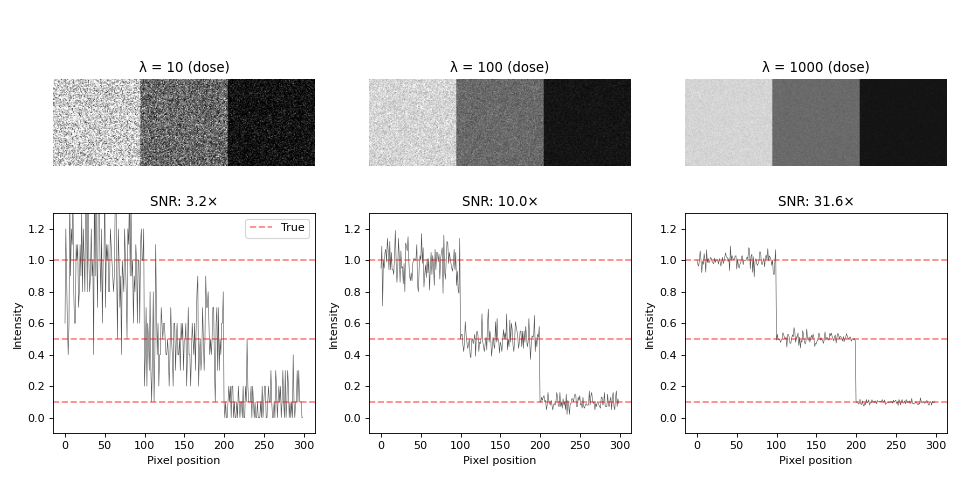
Observations:
Low dose (λ=10): Severe graininess, dim region barely visible, SNR≈3×
Medium dose (λ=100): Moderate noise, all regions distinguishable, SNR≈10×
High dose (λ=1000): Smooth appearance, clear boundaries, SNR≈32×
Bright regions (u=1.0) have large absolute noise but good relative SNR
Dim regions (u=0.1) have small absolute noise but poor relative SNR
The dim region at λ=10 has ~30% noise, making quantitative analysis difficult. Increasing dose to λ=1000 reduces noise to ~3%.
Thermal and readout noise
Thermal noise (Gaussian): Electronic components generate random voltage fluctuations with Gaussian distribution:
Unlike Poisson noise, thermal noise is signal-independent: \(\sigma\) is constant across the image.
Readout noise: Analog-to-digital conversion introduces quantization errors and electronic readout noise, also typically Gaussian.
For modern detectors, shot noise usually dominates in low-light conditions, while thermal/readout noise becomes significant in bright conditions or with poor electronics.
Energy-based image denoising
The denoising challenge
Image denoising removes noise while preserving important features like edges and texture. The challenge is balancing noise removal against detail preservation.
Naive approaches fail:
Gaussian blurring: \(u_{\text{smooth}} = G_\sigma * f\) reduces noise by averaging, but also blurs edges, boundaries, and fine details.
Requirements for effective denoising:
Remove noise in smooth regions
Preserve sharp transitions (edges, boundaries)
Maintain quantitative accuracy for measurements
Handle intensity-dependent noise (Poisson)
Energy-based optimization provides a principled framework for this trade-off.
Energy minimization framework
The key idea is to formulate denoising as an optimization problem. The energy functional balances two competing goals:
The two terms are:
Data fidelity term: \(E_{\text{data}}(u) = \frac{1}{2}\|u - f\|^2\) keeps \(u\) close to observed noisy image \(f\)
Regularization term: \(E_{\text{reg}}(u)\) penalizes rough images, encouraging smoothness
The regularization parameter \(\lambda\) controls the trade-off:
where \(R(u)\) is a regularizer (penalty function).
Regularizers: Tikhonov and Total Variation
- Common regularizers:
Tikhonov (L2 penalty):
\[R(u) = \frac{1}{2}\|\nabla u\|^2 = \frac{1}{2}\int \left(\left|\frac{\partial u}{\partial x}\right|^2 + \left|\frac{\partial u}{\partial y}\right|^2\right) dx\,dy\]Uses squared gradients. Here \(\nabla u = \left(\frac{\partial u}{\partial x}, \frac{\partial u}{\partial y}\right)\) is the gradient vector, and \(\|\nabla u\|^2\) is the squared magnitude (L2 norm squared).
Total variation (L1 penalty):
\[R(u) = \text{TV}(u) = \int |\nabla u| \, dx\,dy = \int \sqrt{\left(\frac{\partial u}{\partial x}\right)^2 + \left(\frac{\partial u}{\partial y}\right)^2} \, dx\,dy\]Uses gradient magnitude. Here \(|\nabla u|\) is the magnitude of the gradient vector (L2 norm of the gradient). The L1 norm is applied to this scalar magnitude field.
- How do these penalties differ for simple signals?
1D example:
Consider three 1D signals going from value \(0\) to \(6\):
Signal A (sharp edge):    [0, 0, 6, 6]
Signal B (smooth ramp):   [0, 2, 4, 6]
Signal C (noisy):         [0, 1, 5, 6]
TV penalties (sum of absolute differences):
Signal A: \(|0-0| + |6-0| + |6-6| = 6\)
Signal B: \(|2-0| + |4-2| + |6-4| = 6\)
Signal C: \(|1-0| + |5-1| + |6-5| = 6\)
TV treats all equally because it only cares about total change, not distribution. Sharp edges and smooth ramps have the same penalty.
Tikhonov penalties (sum of squared differences):
Signal A: \(\frac{1}{2}(0^2 + 6^2 + 0^2) = 18\) (huge penalty for sharp edge)
Signal B: \(\frac{1}{2}(2^2 + 2^2 + 2^2) = 6\) (much smaller)
Signal C: \(\frac{1}{2}(1^2 + 4^2 + 1^2) = 9\)
Tikhonov strongly prefers smooth transitions. Signal B (smooth ramp) has the lowest penalty, while Signal A (sharp edge) is penalized \(3\) times more heavily.
2D formulation:
For a continuous 2D image \(u(x,y)\), Total Variation is:
Discretization process:
To compute TV for digital images with discrete pixel values \(u_{i,j}\), we replace continuous operations with discrete approximations:
Integral → Sum: The integral \(\int \cdots dx\,dy\) becomes a sum \(\sum_{i,j}\) over all pixels
Partial derivatives → Finite differences:
\(\frac{\partial u}{\partial x}\) at pixel \((i,j)\) is approximated by the forward difference: \(u_{i+1,j} - u_{i,j}\)
\(\frac{\partial u}{\partial y}\) at pixel \((i,j)\) is approximated by the forward difference: \(u_{i,j+1} - u_{i,j}\)
Gradient magnitude stays the same: \(\sqrt{(\cdots)^2 + (\cdots)^2}\)
This gives the discrete TV formula:
Example: For a \(3 \times 3\) image, the gradient at pixel \((1,1)\) uses its right neighbor \((2,1)\) for the x-direction and bottom neighbor \((1,2)\) for the y-direction.
Intuition:
Imagine the image as a height map where bright spots are tall peaks and background is low valleys. TV measures the total climb as you walk across every pixel. Noise creates many tiny jagged bumps (high TV cost). Real features like Bragg peaks are steep but localized (moderate TV cost). Smooth background is flat (zero TV cost).
When minimizing \(E(u) = \frac{1}{2}\|u - f\|^2 + \lambda \cdot \text{TV}(u)\), the algorithm removes jagged noise bumps while keeping real peaks sharp.
Why TV preserves edges
The key difference between TV and Tikhonov is how penalties grow with gradient size. Consider a gradient of magnitude \(g\):
Tikhonov: Penalty \(\propto g^2\) (quadratic growth)
TV: Penalty \(\propto g\) (linear growth)
For small gradients (:math:`g = 0.1`):
Tikhonov: \(\frac{1}{2}(0.1)^2 = 0.005\)
TV: \(0.1\)
TV penalizes small gradients more heavily, suppressing noise.
For large gradients (:math:`g = 5.0`, typical edge):
Tikhonov: \(\frac{1}{2}(5.0)^2 = 12.5\) (huge penalty)
TV: \(5.0\) (linear growth)
Tikhonov’s squared penalty explodes for edges, forcing the optimizer to smooth them. TV’s linear penalty grows slowly, making sharp edges acceptable. During denoising, TV preserves sharp edges while Tikhonov produces Gaussian-like blurring.
Gradient descent and regularization
When minimizing just the data term \(\frac{1}{2}\|u - f\|^2\), the solution is simply \(u = f\) (the noisy image itself). This overfits to the noise.
During gradient descent, the regularization gradient pushes pixel values toward configurations with smaller gradients (smoother variations). This is similar to weight decay in machine learning.
For Tikhonov regularization \(R(u) = \frac{1}{2}\|\nabla u\|^2\):
The Laplacian term \(\Delta u\) (see Laplacian) acts like diffusion, smoothing out rapid fluctuations (noise) while preserving the overall structure. The negative sign arises because \(\frac{\partial}{\partial u}\|\nabla u\|^2 = -2\Delta u\). Larger \(\lambda\) means stronger smoothing, trading off fidelity to the noisy data for a simpler solution.
Detailed iteration example
Consider a simple \(3 \times 3\) noisy image. Here is a step-by-step walkthrough of the first iteration.
Initial setup:
Noisy image \(f\):
f = [[1.0, 1.2, 1.1],
     [1.1, 2.8, 1.3],
     [1.0, 1.3, 1.2]]
True (clean) image \(u_{\text{true}}\):
u_true = [[1.0, 1.0, 1.0],
          [1.0, 3.0, 1.0],
          [1.0, 1.0, 1.0]]
The center has a peak (value \(3.0\)), corrupted by noise to \(2.8\). Surrounding pixels have small noise.
Initial guess: Start with the noisy image \(u^{(0)} = f\)
Parameters: \(\lambda = 0.2\) (regularization strength), \(\tau = 0.1\) (step size)
Step 1: Compute the data fidelity gradient
\[\nabla_{\text{data}} = u^{(0)} - f\]At the center pixel \((1,1)\):
\[\nabla_{\text{data}}(1,1) = 2.8 - 2.8 = 0\]At corner \((0,0)\):
\[\nabla_{\text{data}}(0,0) = 1.0 - 1.0 = 0\]Initially, this is all zeros since we started with \(u^{(0)} = f\).
Step 2: Compute the TV gradient
The TV gradient at each pixel depends on its neighbors. For pixel \((i,j)\), the TV gradient involves finite differences.
For the center pixel \((1,1)\) with value \(u_{1,1} = 2.8\):
Recall from the discretization section that the TV subgradient at pixel \((i,j)\) is computed using finite differences in both \(x\) and \(y\) directions. First, compute the four gradients:
\[\begin{split}\begin{align} g_x^+ &= u_{2,1} - u_{1,1} = 1.3 - 2.8 = -1.5 \\ g_x^- &= u_{1,1} - u_{0,1} = 2.8 - 1.1 = 1.7 \\ g_y^+ &= u_{1,2} - u_{1,1} = 1.3 - 2.8 = -1.5 \\ g_y^- &= u_{1,1} - u_{1,0} = 2.8 - 1.2 = 1.6 \end{align}\end{split}\]The TV subgradient at \((1,1)\) then combines these using the discrete formula:
\[\nabla_{\text{TV}}(1,1) \approx -\frac{g_x^-}{\sqrt{(g_x^-)^2 + (g_y^-)^2 + \epsilon}} + \frac{g_x^+}{\sqrt{(g_x^+)^2 + (g_y^+)^2 + \epsilon}} - \frac{g_y^-}{\sqrt{(g_x^-)^2 + (g_y^-)^2 + \epsilon}} + \frac{g_y^+}{\sqrt{(g_x^+)^2 + (g_y^+)^2 + \epsilon}}\]where \(\epsilon = 10^{-8}\) is a small constant for numerical stability.
With \(g_x^- = 1.7\), \(g_y^- = 1.6\):
\[\sqrt{(1.7)^2 + (1.6)^2} = \sqrt{2.89 + 2.56} = \sqrt{5.45} \approx 2.33\]With \(g_x^+ = -1.5\), \(g_y^+ = -1.5\):
\[\sqrt{(-1.5)^2 + (-1.5)^2} = \sqrt{2.25 + 2.25} = \sqrt{4.5} \approx 2.12\]The TV gradient becomes:
\[\nabla_{\text{TV}}(1,1) \approx -\frac{1.7}{2.33} + \frac{-1.5}{2.12} - \frac{1.6}{2.33} + \frac{-1.5}{2.12}\]\[\approx -0.73 - 0.71 - 0.69 - 0.71 = -2.84\]Step 3: Combine gradients and update
The total gradient is:
\[\nabla E(1,1) = \nabla_{\text{data}}(1,1) + \lambda \cdot \nabla_{\text{TV}}(1,1) = 0 + 0.2 \times (-2.84) = -0.568\]The gradient descent update:
\[u^{(1)}(1,1) = u^{(0)}(1,1) - \tau \cdot \nabla E(1,1) = 2.8 - 0.1 \times (-0.568) = 2.8 + 0.057 = 2.857\]What happened?
The center pixel moved from \(2.8\) toward \(2.857\), getting closer to the true value \(3.0\). The TV gradient detected that the center is below its neighbors and pushed it upward. Meanwhile, the noisy surrounding pixels would be pushed downward toward \(1.0\).
After iteration 1:
u^(1) ≈ [[1.0,   1.15,  1.05],
         [1.05,  2.857, 1.25],
         [1.0,   1.25,  1.15]]
The peak is sharper (\(2.857\) closer to \(3.0\)), and surrounding noise is reduced. After many iterations, the solution converges to nearly the true image.
Why does energy increase while PSNR improves?
The energy functional \(E(u) = \frac{1}{2}\|u - f\|^2 + \lambda \cdot \text{TV}(u)\) is NOT the same as reconstruction quality (PSNR). After several iterations, the energy may increase while PSNR keeps improving. This happens because:
The data fidelity term \(\|u - f\|^2\) (distance from noisy input) increases as we move away from \(f\)
BUT the solution gets closer to the ground truth (higher PSNR)
The TV regularizer pushes toward sharper edges, which is correct for the true image but increases distance from the noisy observation
The optimal denoised image is not the noisy image itself (\(u = f\) gives minimum energy but poor PSNR), but rather a compromise that removes noise while preserving structure.
Quality metric: PSNR
PSNR (Peak Signal-to-Noise Ratio) measures image quality by comparing the denoised result to the ground truth:
where \(\text{MAX}\) is the maximum possible pixel value (\(1.0\) for normalized images) and \(\text{MSE} = \frac{1}{N}\sum_{i=1}^{N}(u_i - u_{\text{true},i})^2\) is the mean squared error.
Interpretation:
Higher PSNR = better quality (less error)
Typical range: \(20\)-\(40\) dB for image denoising
PSNR \(> 30\) dB is considered good quality
PSNR \(< 20\) dB indicates significant distortion
Extensions to higher dimensions
3D volumes and time series
The energy functional extends naturally to 3D. For a 3D volume or time series stack \(u(x,y,z)\) or \(u(x,y,t)\):
Tikhonov 3D:
\[R(u) = \frac{1}{2}\int \left[\left(\frac{\partial u}{\partial x}\right)^2 + \left(\frac{\partial u}{\partial y}\right)^2 + \left(\frac{\partial u}{\partial z}\right)^2\right] dx\,dy\,dz\]Total Variation 3D:
\[R(u) = \int \sqrt{\left(\frac{\partial u}{\partial x}\right)^2 + \left(\frac{\partial u}{\partial y}\right)^2 + \left(\frac{\partial u}{\partial z}\right)^2} \, dx\,dy\,dz\]The gradient and divergence operators extend to 3D using forward and backward differences along all three axes.
4D-STEM datacubes
In scanning transmission electron microscopy (STEM), a focused electron probe rasters across the sample while recording a full 2D diffraction pattern at each scan position. This produces a four-dimensional dataset:
Two spatial dimensions: probe position \((x, y)\) in real space
Two reciprocal dimensions: diffraction pattern \((k_x, k_y)\) in momentum space
The resulting datacube has shape \((N_x, N_y, K_x, K_y)\) where:
\((N_x, N_y)\) = scan positions (typically \(64 \times 64\) to \(256 \times 256\))
\((K_x, K_y)\) = diffraction pattern pixels (typically \(256 \times 256\) to \(512 \times 512\))
This 4D dataset contains rich information about local structure, strain, electric fields, and magnetic fields, but suffers from shot noise when dose is limited.
The challenge is balancing dose (signal quality) with sample damage. Lower dose means less radiation damage and faster acquisition, but more shot noise in each diffraction pattern. Denoising can recover signal quality without increasing dose.
Denoising approaches:
The key question is which dimensions should be coupled in the TV regularization.
Approach 1: Independent diffraction patterns (2D TV)
Apply TV only within each \((K_x, K_y)\) plane at fixed scan position \((i,j)\). Each pattern is smoothed independently.
Pros: Simple, parallelizable
Cons: Ignores correlation between scan positions, can’t exploit redundancy
Approach 2: Across scan positions (3D TV)
For each fixed detector pixel \((K_x, K_y)\), denoise across all scan positions. At each detector pixel, intensity values vary smoothly as the probe scans across the sample.
Approach 3: Probe position chunking (4D TV)
Apply TV regularization coupling all dimensions, but process probe positions in sequential groups rather than all at once. For example, with \(255\) diffraction patterns, process positions \(1\)-\(20\) as one group, \(21\)-\(40\) as the next group, and so on.
As the probe scans, its phase and configuration may evolve due to stage drift, defocus changes, or beam instability. Processing in sequential chunks of \(20\)-\(40\) positions captures local probe consistency while adapting to these gradual changes.
Pros: Exploits 4D correlation within probe-consistent regions, computationally tractable, physically motivated
Cons: Chunk boundaries need consideration, requires choosing appropriate chunk size
Approach 4: Spatial patches (4D TV)
Divide datacube into spatial patches (smaller regions of scan positions), then apply full 4D TV within each patch. This couples all diffraction pixels \((K_x, K_y)\) with the local scan positions.
Within each \(16 \times 16\) scan patch, full 4D coupling (all diffraction pixels coupled with those \(16 \times 16\) positions) is achieved, but different patches can have different characteristics. This is particularly useful for heterogeneous samples where different regions have different material properties.
Pros: Balances 4D correlation with computational feasibility, adapts to local structure, parallelizable
Cons: Patch boundaries need careful handling (overlap and blend)
Physics-based denoising
Instead of using TV regularization that only assumes smoothness, a physics-based forward model can generate diffraction patterns from a small number of interpretable parameters. By keeping parameter count low while fitting the noisy data, denoising is achieved through the model’s inherent constraints.
Rather than having \(512 \times 512 = 262{,}144\) free parameters (one per pixel), parameterize the diffraction pattern using physics:
where both probe and object are modeled with far fewer parameters.
Why this denoises:
Dimensionality reduction: \(262{,}144\) noisy measurements compressed to \(10\)-\(100\) physics parameters
Physical constraints: Model can only generate physically reasonable patterns
Regularization through parameterization: Limited expressiveness prevents fitting noise
Interpretable: Parameters have physical meaning (phase gradient, defocus)
Example parameterization:
Object phase (local region):
This uses only \(3\) parameters: mean phase \(\phi_0\) and phase gradients \(\frac{\partial \phi}{\partial x}\), \(\frac{\partial \phi}{\partial y}\).
Probe: \(2\)-\(5\) parameters (defocus, astigmatism, probe center position)
Total: \(10\)-\(25\) parameters for \(200{,}000\) measurements provides strong regularization.
Comparison:
TV denoising:
Assumes smoothness only
No physical model required
Very fast (gradient descent on pixels)
Works on any image type
Cannot recover information beyond noise
Physics-based model:
Requires specific physics (wave propagation)
Explicit probe and object models
Slower (nonlinear parameter fitting)
Domain-specific (requires physical understanding)
Can interpolate missing information using physics
Use physics-based models when you need physically meaningful parameters (phase gradients for DPC, strain) or want to enforce specific physical constraints. Use TV when you need clean patterns quickly for downstream analysis without physical interpretation.
Gaussian kernel density estimation (KDE)
The problem: scattered points, no smooth picture
Imagine you are looking at atoms through an electron microscope. The detector records individual electron hits at precise positions — but those positions are scattered, noisy, and not on a regular grid. You need to turn those scattered detections into a smooth image that reveals where the atoms actually are.
The same problem appears in drift correction for scanning microscopy: the probe scans line by line, but drift causes each measurement to be acquired at a sub-pixel position that doesn’t fall on the regular output grid. We know where each sample was taken, but those positions are irregularly spaced. The task is to reconstruct a regular-grid image from these scattered sub-pixel samples — a classic scatter-to-grid problem.
The core intuition is simple: each measurement tells you “something is near here.” If you place a soft, blurry bump at each measurement location and add them all up, regions with many nearby measurements become bright, and empty regions stay dark. That blurry bump is a Gaussian kernel, and the sum is a kernel density estimate.
The one knob that matters: bandwidth
The width of each Gaussian bump is called the bandwidth (\(\sigma\)). This is the single most important parameter:
Too narrow (small \(\sigma\)): You see every individual point as a separate spike. Noise dominates. You haven’t learned anything beyond the raw data.
Too wide (large \(\sigma\)): Everything blurs together. Real structure (like separate atom columns) merges into one blob. You’ve thrown away the information.
Just right: The bumps overlap enough to reveal the underlying pattern, but not so much that distinct features merge.
Try it yourself — the interactive widget below lets you place points and drag the bandwidth slider to see this trade-off directly.
1D interactive demo
Click on the canvas to place data points. Each point gets a Gaussian kernel (light blue). The KDE estimate (dark blue) is the normalized sum. Drag the \(\sigma\) slider to see how bandwidth controls smoothness.
2D interactive demo: atom positions on a grid
In electron microscopy, the data is 2D — each detection has an \((x, y)\) position. Click the left panel to place sample points (simulating atom positions or drifted scan pixels). The middle panel shows the raw Gaussian weight at each grid cell. The right panel shows the normalized KDE output — the reconstructed image.
Click “Load atoms” to see a small crystal lattice with realistic sub-pixel drift and jitter. Then adjust \(\sigma\) to see how bandwidth affects the reconstructed image.
The math behind the bumps
Now that you have the intuition, here is the formula. For \(n\) data points \(x_1, x_2, \ldots, x_n\), the KDE at any position \(x\) is:
where \(K_\sigma\) is the Gaussian kernel with bandwidth \(\sigma\):
Each data point contributes a Gaussian bump centered at its location. The sum of all bumps, divided by \(n\), gives the density estimate. The \(\frac{1}{\sigma\sqrt{2\pi}}\) normalization ensures each kernel integrates to 1.
In 2D, the kernel becomes:
This is the product of two 1D Gaussians (isotropic kernel). The same bandwidth trade-off applies: small \(\sigma\) resolves individual points, large \(\sigma\) blurs them together.
Worked example
Consider three data points at \(x_1 = -1\), \(x_2 = 0\), \(x_3 = 2\) with \(\sigma = 0.5\).
At \(x = 0\):
Computing each kernel value:
The point at \(x_2 = 0\) dominates because its kernel is centered exactly at the evaluation point. The point at \(x_3 = 2\) contributes almost nothing because it is 4 standard deviations away.
Application: KDE bilinear for scatter-to-grid reconstruction
When measurements land at irregular sub-pixel positions, KDE is combined with bilinear interpolation in a technique called KDE bilinear splatting:
Bilinear splatting: Each source pixel at sub-pixel position \((x_a, y_a)\) distributes its intensity to the 4 nearest grid points using bilinear weights
Gaussian KDE smoothing: Convolve both the intensity buffer and the weight buffer with a Gaussian kernel to fill gaps when pixel spacing exceeds 1
Normalize: Divide smoothed intensity by smoothed weight
where \(G_\sigma\) is the Gaussian kernel and \(*\) denotes convolution. Without the Gaussian smoothing step, gaps appear wherever samples land more than 1 pixel apart on the output grid. The KDE step fills those gaps by spreading each measurement’s influence over a soft neighborhood.
Subpixel Gaussian peak fitting
Why subpixel?
A camera samples a continuous intensity distribution on a discrete pixel grid. The true center of a peak (an atomic column in a HAADF-STEM image of MoS2, or a Bragg disk in a diffraction pattern) almost never lands exactly on a pixel center. If we simply take the brightest pixel (argmax), our position estimate is quantized to integers and carries up to ±0.5 px of error. Strain mapping, drift correction, and picometer-precision structural measurements all need far better than that.
The way out: the data is discrete, but the model we fit is continuous. A Gaussian’s center parameter \(x_0\) can take any real value, including values between pixels. Because the fit uses every pixel under the peak, not just the brightest one, noise averages out and the center can be located to a small fraction of a pixel.
Why is the peak shape a Gaussian?
The exponential form \(e^{-x^2/2\sigma^2}\) is not fundamental scattering physics. It is the statistical signature of many independent blurs applied in sequence. What the detector records is an (ideally point-like) atomic column convolved with every spreading process in the imaging chain:
Probe shape: aperture diffraction and residual aberrations give the electron probe a bell-shaped central lobe
Thermal vibration: each atom vibrates in an approximately harmonic potential, so its displacement is genuinely Gaussian-distributed (this is the Debye–Waller smearing)
Source size: the finite electron source is demagnified onto the sample as another small blur
Scan jitter and residual drift: random probe-position errors during acquisition
Detector point-spread: each electron’s signal spreads over neighboring pixels
The central limit theorem applies to convolution: stacking many independent blurs drives the combined profile toward a Gaussian regardless of each blur’s exact shape, with the variances adding up:
This is why the Gaussian is such a robust model for atomic columns and focused spots, and why the fitted \(\sigma\) is a physically meaningful number (an estimate of the total blur budget), not just a shape knob.
Where the Gaussian model breaks: shapes set by geometry rather than stacked blurs. The classic case is Bragg disks in 4D-STEM: sharp-edged top-hat shapes from the condenser aperture, which is why disk-detection codes (e.g. py4DSTEM) use template cross-correlation instead of Gaussian fitting. Strong asymmetry (astigmatism, coma, overlapping neighbors) also calls for richer models, such as elliptical or multi-peak Gaussians.
Step 1: the model and its four knobs
The model is one equation:
Each symbol is a physical knob:
\(A\): how tall the peak is (signal strength)
\(x_0\): where its center sits (the number we ultimately want)
\(\sigma\): how wide it is (the blur budget from the section above)
\(B\): the floor it stands on (background level)
Don’t memorize the equation; play with it:
Build the mental map:
\(A\) only stretches the peak taller; the center never moves.
\(x_0\) slides the whole peak sideways, and it can stop between two bars. The bars (what the detector records) change shape subtly as it slides: that shape change is the information subpixel fitting reads out.
\(\sigma\) fattens or sharpens the peak; watch how many bars carry signal.
\(B\) lifts everything uniformly; the peak shape is untouched.
Step 2: fit it yourself
Now flip the problem around. Real (noisy) data appears, and the question becomes: which knob settings produced this data? Fitting is nothing more than turning the knobs until the model matches the data.
You need a score to know when you’re close. At each pixel, measure the mismatch between your curve and the data point (the orange sticks), square it (so left/right misses don’t cancel), and add them all up. That total is called \(\chi^2\) (“chi-squared”). Lower is better. Try it yourself:
Build the mental map:
Drag \(x_0\) slowly across the peak and watch the dot in the bottom strip: your score falls, bottoms out, and rises again: a valley. The valley bottom is the answer, and it sits at a subpixel position.
That is the simplest fitting method there is: scan the position, keep the lowest score. The computer only improves the search: it starts at the brightest pixel and rolls downhill, reaching the bottom in a few steps (this is what
scipy.optimize.curve_fitdoes internally).Get the other three knobs wrong (too wide, wrong floor) and notice the valley gets shallower and its bottom shifts. The four knobs must be fitted together.
The noisy dots never lie exactly on any curve, so the best possible χ² is small but never zero. Press New peak and beat the computer’s Auto-fit if you can.
Step 3: the computer’s fit, dissected
The final widget shows the computer playing the same game, live. The red curve is its answer, with each knob drawn where it acts (\(B\) the dashed floor, \(A\) the height bracket, \(\pm\sigma\) the width span, \(x_0\) the center line). The four mini panels show the χ² valley for each knob; every valley bottoms exactly at the fitted value. Press Replay fit to watch the downhill walk, iteration by iteration, with χ² dropping live.
Why the fit beats the brightest pixel (bottom panel: argmax staircase vs the fit’s flat line):
Every pixel votes. A tiny shift of the center visibly unbalances the left tail against the right tail, so the fit senses shifts far smaller than one pixel.
The background is a knob, not a nuisance. Raise the background slider to 0.4 and the fitted center doesn’t budge, because \(B\) absorbs it.
Noise averages out. Lower the dose to ~20 photons and press Re-noise repeatedly: the fitted center jitters by only a fraction of a pixel. More photons or a wider peak make the valley sharper and the answer steadier.
One practical habit: after any fit, sanity-check the knobs before trusting them. A center that ran out of the window, or a σ that collapsed to a spike or exploded past the window, means the fit latched onto noise or background; throw it away. When millions of peaks make full fitting too slow, cheaper shortcuts exist (center of mass, 3-point log-parabola, Fourier upsampling), all trading precision for speed.
The 2D case: atomic columns in MoS₂
In 2D 4D-STEM/HAADF imaging, the model becomes an elliptical (here isotropic) Gaussian:
and the pipeline used in practice is:
Detect candidate peaks as local maxima (integer precision)
Extract a small patch (e.g. 9×9 px) around each maximum
Fit a 2D Gaussian to each patch independently (Gauss–Newton, initialized from COM)
Validate: reject fits that diverge or run out of the patch
The widget below simulates a monolayer MoS2 HAADF image: a honeycomb where one sublattice is bright Mo columns and the other is dimmer S2 columns (Z-contrast). Every column is fitted live; with the pixel scale set by the MoS2 lattice constant (\(a = 3.16\) Å = 16 px), the RMS error converts directly to picometers.
What to try:
Compare the RMS rows: argmax is stuck near ~0.4 px (~8 pm here) no matter the dose; that is the quantization floor. The Gaussian fit reaches a few pm at high dose.
Lower the dose: fit error grows as \(1/\sqrt{N_{\text{photons}}}\), and the dim S2 columns degrade first because they have half the signal. This is exactly why light elements are the hard case in real MoS2 metrology.
Click a column and study the 9×9 patch: the white circle (truth), gray square (argmax), and red × (fit) usually disagree by visible fractions of a pixel.
Press Re-noise while watching one column’s fit; the fitted × jitters by far less than a pixel.
Real-world pitfalls the simulation hints at:
Overlapping tails: neighboring columns leak intensity into each other’s patches, biasing single-peak fits. High-precision work fits clusters of Gaussians simultaneously.
Dim sublattices: a global detection threshold tuned for Mo misses S2; detect and fit sublattices separately.
Background gradients: a constant-\(B\) model absorbs flat background only; slowly varying diffuse intensity needs a planar or fitted background term.