quantem.widget#
Interactive, GPU-aware Python widgets for electron microscopy. Use them in Jupyter notebooks, as local HTML files, or from the command line.
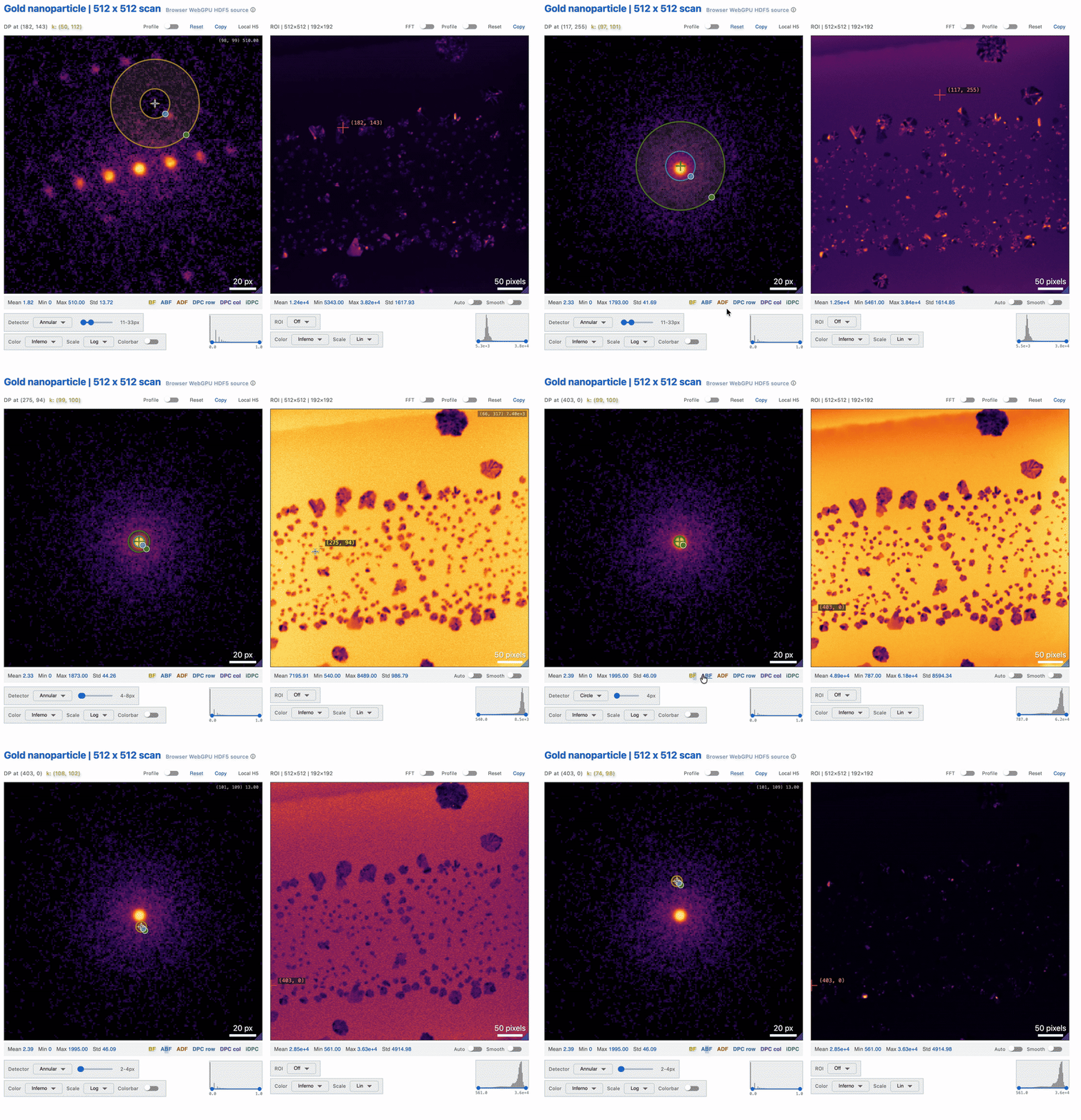
Demo: Show4DSTEM HTML with WebGPU. Explore live diffraction-pattern and virtual-detector views locally in a browser on a personal laptop or supported phone, without a Python kernel or remote compute server. Thanks to Serin Lee for sharing this liquid-cell Au nanoparticle 4D-STEM dataset. Check Serin’s 4D-STEM and 5D-STEM segmentation and clustering work (paper) and the source data (Zenodo).
Start with an interactive demo#
The crystal-to-volume demo route connects ShowCIF, Show3D, and Show3DSlices. Inspect a model, then compare depth planes. Each notebook explains what to change in the widget and what the preview does, and does not, represent.
Start with ARINA 4D-STEM in Jupyter#
The demo above is the same Show4DSTEM workflow you can use at the microscope.
After installing, open a Jupyter notebook, load a completed ARINA
*_master.h5 file, and pass the result directly to the widget:
from quantem.widget import Show4DSTEM, read_4dstem

data = read_4dstem("/data/session/scan_000_master.h5")
viewer = Show4DSTEM(data)
viewer
read_4dstem(...) keeps the counts encoded on CUDA or Apple Metal when
quantem.gpu and a GPU are present (a Dataset4dstemGPU) and reads them into
a quantem core Dataset4dstem elsewhere, so the cell runs on any machine.
Leave viewer as the
final line, then move through scan positions or drag the detector to update the
virtual image. Continue with the Show4DSTEM tutorial or
Load and I/O.
Prefer the command line?#
Point the quantem command at a 4D-STEM master or a folder of masters when
you want the viewer without writing a notebook:
quantem show4dstem ./masters/           # 4D-STEM master(s) -> live viewer notebook
quantem show4dstem ./masters/ --html    # shareable offline WebGPU HTML
It saves to ~/Downloads, opens automatically, and picks the GPU for you. Full
details are on the command line page.
Built for two platforms#
We serve two audiences first:
macOS on Apple M-chips - the Metal (MPS) GPU.
Linux with NVIDIA CUDA - workstations and HPC.
CUDA and MPS are the primary accelerated backends. With quantem.gpu
available, read_4dstem keeps supported acquisitions encoded on the GPU at
full detector resolution (about 0.1 to 2 GiB for a 512 x 512 x 192 x 192 scan
instead of 18 GiB). Otherwise the portable viewer loader reads into host memory,
reports that route, and checks the dense allocation against a memory ceiling.
Viewers also accept ordinary NumPy arrays supplied by a user.
For calibration or denoising that requires GPU-resident data, call
quantem.gpu.io.load explicitly and follow that package’s hardware requirements.
The portable viewer loader is not a guarantee of GPU execution. See
Load and I/O for both paths.
Widgets#
Widget |
Use it for |
Tutorial · API |
|---|---|---|
|
Interactive traces, live reconstruction metrics, line profiles, and linked image snapshots |
|
|
One or many 2D images: contrast, FFT, ROIs, line profiles, scale bars |
|
|
A 3D volume scrubbed slice-by-slice (e.g. a ptychographic object) |
|
|
Linked top and oblique cuts through a 3D volume |
|
|
4D-STEM: live virtual detectors, multi-master review, and WebGPU HTML export |
|
|
Ptychography aberration review: phase, FFT, BF-count tradeoffs, and WebGPU folder export |
|
|
2D/3D diffraction d-spacing: Bragg spots, rings, center finding, k calibration |
|
|
Pair distribution function analysis (I(k), F(k), G(r), g(r)) of masked, probe, or line regions of a 4D-STEM scan |
|
|
Unit cells, specimen tilt, and projected potential/phase previews |
|
|
Pick an origin and two lattice vectors on a 2D image |
The Tutorials walk through each widget on real public data where practical, with compact synthetic data only where it keeps an example portable. Real tutorial datasets are downloaded from public data hosting such as Hugging Face and cached locally; they are not committed to this repository or bundled into the Python wheel. That keeps clone size and microscope-PC installs small while still letting the rendered docs use realistic microscopy examples. The Show4DSTEM export recipes show how to choose between compact report HTML, interactive raw-4D WebGPU HTML, and terminal exports. See also how to save and share widget exports. The API reference documents every parameter, method, and interactive control (and doubles as a UI-test spec for automated agents). All example data here is synthetic or pulled from a public Hugging Face dataset - no private data ships in the docs.
Image and volume widgets accept NumPy arrays, PyTorch tensors (CPU or GPU), or quantem
Dataset (Dataset2d / Dataset3d / Dataset4dstem), pulling calibration and
units automatically from the dataset when present. Crystal widgets accept a CIF
path or ASE structure instead.
Interactive without a Python kernel#
Show2D, Show3D, and Show3DSlices can embed display data so their saved views
remain interactive without a running kernel: scrub, zoom, change contrast, and
toggle the FFT in the browser. Export with encoding="full" to preserve display
values, or explicitly choose encoding="uint8" for a smaller, quantized browse
payload. The widget manager may still require network access.
For small datasets, Show4DSTEM can recompute virtual detectors in browser
WebGPU. Its exports make dtype explicit: uint8 is a compact browse payload,
while uint16 retains a wider detector-count range. See
Show4DSTEM export recipes for the tradeoffs.
See Installation to get started.
Citing quantem.widget#
If the quantEM interactive framework—including quantem.widget, GPU-accelerated
I/O, analysis, or reconstruction workflows on MPS or CUDA—contributed to your
research, please consider citing Lee et al., Interactive Framework for
Real-Time 4DSTEM Analysis and Reconstruction, Microscopy and Microanalysis
32 (Supplement 1), ozag053.941 (2026),
https://doi.org/10.1093/mam/ozag053.941.
Getting help#
Questions or bugs: open an issue at github.com/electronmicroscopy/quantem.widget/issues.
New widgets and cross-widget refactors: discuss first (issue or maintainer). In-widget bug fixes can open a pull request directly. See Pull requests and CONTRIBUTING.md.
Tutorial data: public bobleesj/quantem-data. The dataset card records provenance; maintained download examples and contribution instructions live in Contribute tutorial data. The shared validator and metadata template belong to
quantem.data; Hugging Face stores the data and its descriptive metadata.Maintained by the Ophus group.