Getting Started#
Setup#
You need Python 3.11+, Node.js 20+, and the quantem core library.
Option A: conda (recommended)#
conda create -n widget python=3.12 nodejs=20 -y
conda activate widget
pip install quantem

git clone https://github.com/bobleesj/quantem.widget.git
cd quantem.widget
npm install
npm run build
pip install -e .
Option B: uv#
git clone https://github.com/bobleesj/quantem.widget.git
cd quantem.widget
npm install
npm run build
uv sync
Note: With
uv, prefix Python commands withuv run, or activate withsource .venv/bin/activate.
Verify#
python -c "from quantem.widget import Show2D; print('OK')"
Making changes#
JavaScript (layout, rendering, UI)#
npm run dev— watch mode, rebuilds on saveSet
%env ANYWIDGET_HMR=1in the notebook for live reload without re-running cellsEdit
js/<widget>/index.tsxRe-run the notebook cell (or let HMR pick it up automatically)
Python (data processing, observers)#
pip install -e .— onceEdit
src/quantem/widget/<widget>.pyRestart the kernel and re-run cells.
Code organization#
Each widget is exactly one Python file + one TSX folder. No inheritance hierarchy — each widget is self-contained.
quantem.widget/
├── js/                          # TypeScript/React source
│   ├── align2d/index.tsx        # One folder per widget (each is self-contained)
│   ├── bin/index.tsx
│   ├── edit2d/index.tsx
│   ├── mark2d/index.tsx
│   ├── show1d/index.tsx
│   ├── show2d/index.tsx
│   ├── show3d/index.tsx
│   ├── show3dvolume/index.tsx
│   ├── show4d/index.tsx
│   ├── show4dstem/index.tsx
│   ├── showcomplex/index.tsx
│   ├── colormaps.ts             # ── Shared JS (used by all widgets) ──
│   ├── format.ts                #   Data extraction, number formatting
│   ├── histogram.ts             #   Histogram computation
│   ├── scalebar.ts              #   Scale bar, colorbar, figure export
│   ├── stats.ts                 #   Data statistics, log scale, clipping
│   ├── theme.ts                 #   Light/dark theme detection
│   ├── tool-parity.ts           #   Tool lock/hide logic
│   └── webgpu-fft.ts            #   GPU-accelerated FFT with CPU fallback
├── src/quantem/widget/          # Python source
│   ├── align2d.py               # One file per widget
│   ├── bin.py
│   ├── edit2d.py
│   ├── mark2d.py
│   ├── show1d.py
│   ├── show2d.py
│   ├── show3d.py
│   ├── show3dvolume.py
│   ├── show4d.py
│   ├── show4dstem.py
│   ├── showcomplex.py
│   ├── array_utils.py           # ── Shared Python (used by all widgets) ──
│   ├── json_state.py            #   State save/load envelope format
│   ├── tool_parity.py           #   Tool lock/hide validation
│   └── static/                  # Built JS bundles (generated by npm run build)
├── tests/                       # pytest unit tests + Playwright E2E tests
├── docs/                        # Sphinx documentation
├── notebooks/                   # Development/testing notebooks
├── package.json                 # esbuild config, npm scripts
└── pyproject.toml               # Python package config
Finding code is simple: Show4DSTEM’s Python is src/quantem/widget/show4dstem.py,
its frontend is js/show4dstem/index.tsx.
Python ↔ JavaScript bridge#
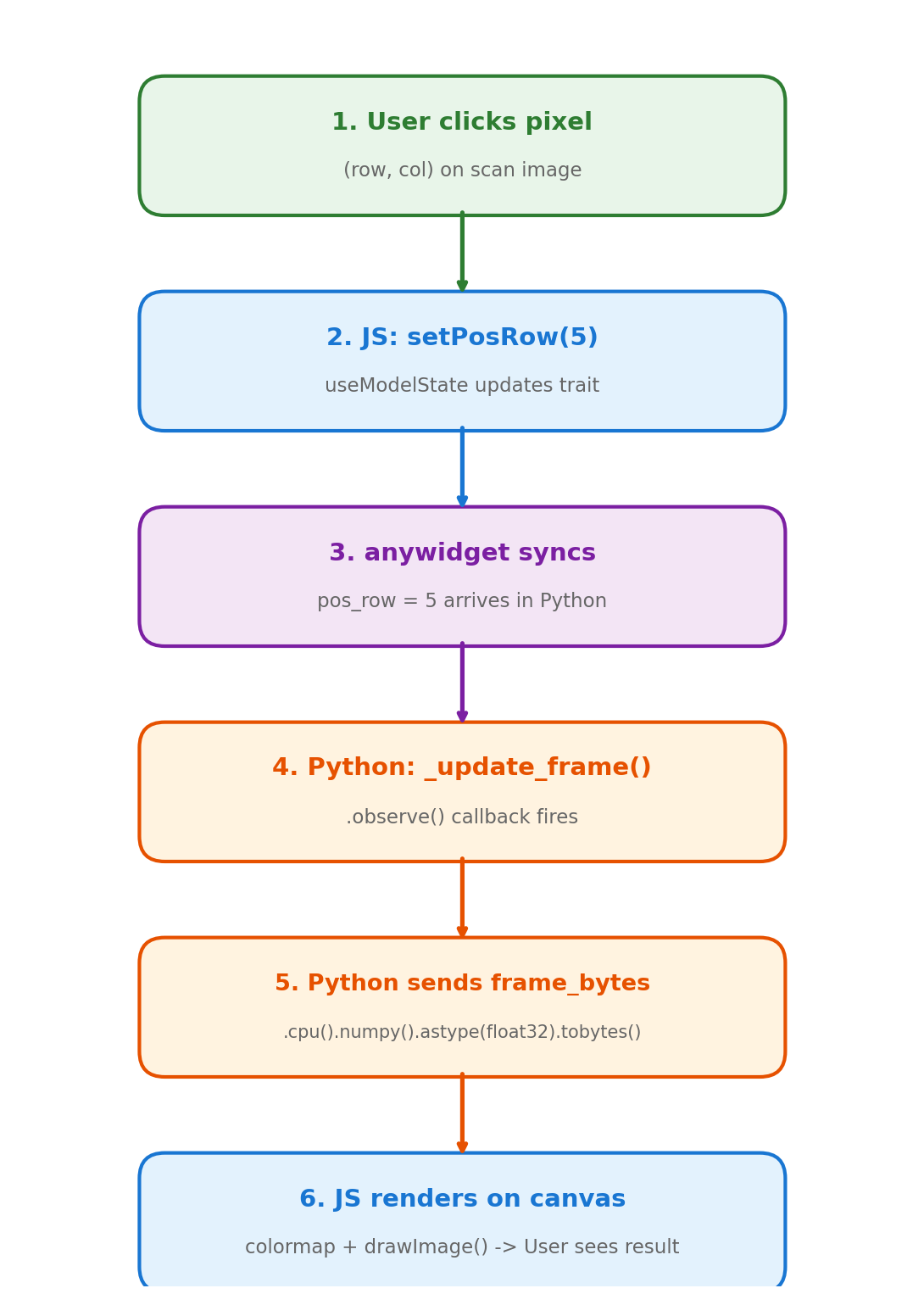
anywidget bridges the two sides. You declare traitlets in Python, and they
automatically sync to React state in the browser.
Python declares traitlets#
Every trait marked .tag(sync=True) is visible to both Python and JavaScript:
class Show4DSTEM(anywidget.AnyWidget):
    pos_row = traitlets.Int(0).tag(sync=True)          # scalar → number
    frame_bytes = traitlets.Bytes(b"").tag(sync=True)   # binary → DataView
JavaScript reads and writes traitlets#
useModelState() works like useState but the value is synced to Python:
const [posRow, setPosRow] = useModelState<number>("pos_row");
const [frameBytes] = useModelState<DataView>("frame_bytes");  // read-only
Calling setPosRow(5) in JavaScript sets pos_row = 5 on the Python object.
Python reacts to changes#
.observe() registers callbacks that fire when a trait changes:
self.observe(self._update_frame, names=["pos_row", "pos_col"])
The full cycle#
When a user clicks a position on the scan image:
JS: user clicks →
setPosRow(5)firesPython:
.observe()triggers_update_frame()Python: extracts the frame, sets
self.frame_bytes = ...JS: receives new
DataView, re-renders the canvas
This round-trip happens in milliseconds.
Trait types#
Python type |
JS type |
Example use |
|---|---|---|
|
|
Position, shape, indices |
|
|
Calibration, ROI params |
|
|
Toggles (log scale, ROI active) |
|
|
Mode selection, titles |
|
|
Image data (raw float32) |
|
|
Compound updates, statistics |
Data flow: GPU to browser#
The full dataset (potentially 16+ GB) stays on GPU or CPU as a PyTorch tensor. On each user interaction, Python extracts a single frame (~64 KB), serializes it as raw bytes, and sends it to the browser. The browser does colormapping and rendering entirely in JavaScript.
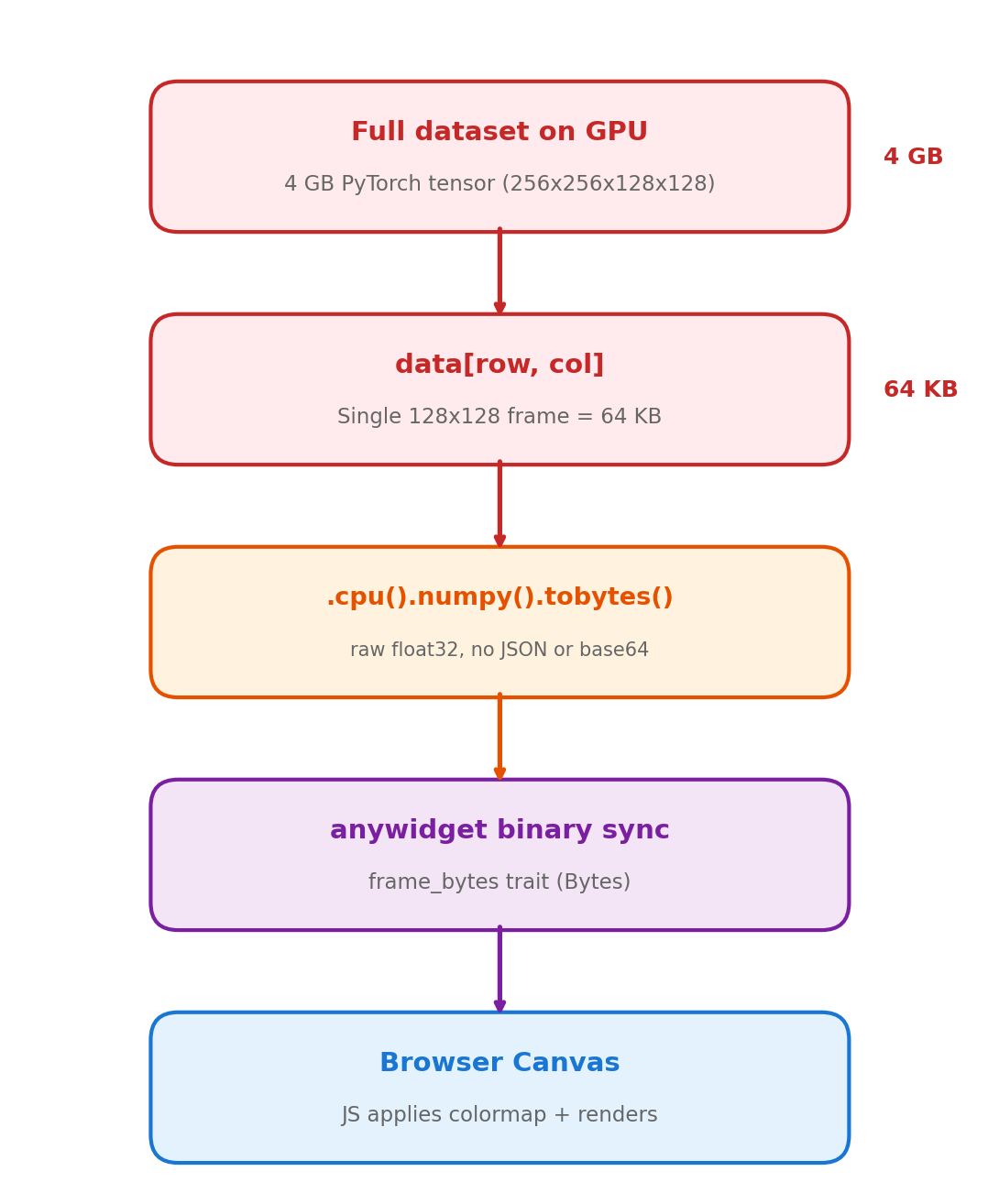
A 16 GB dataset lives on GPU, but only 64 KB crosses the wire per click.
Widget catalog#
Widget |
Description |
GPU |
|---|---|---|
|
1D trace viewer with multi-trace overlay, crosshair, legend |
No |
|
2D image viewer with gallery, ROI, line profiles, FFT, export |
No |
|
3D stack viewer with playback, ROI, FFT, export |
No |
|
Orthogonal slice viewer (XY, XZ, YZ) with FFT, playback |
No |
|
General 4D dataset explorer with nav + signal panels, ROI masking |
Yes |
|
4D-STEM diffraction viewer with virtual imaging, ROI presets |
Yes |
|
Complex-valued 2D viewer (amplitude/phase/HSV/real/imag) |
No |
|
Interactive 2D annotation (points, ROIs, profiles, snap-to-peak) |
No |
|
Interactive crop/pad/mask editor with brush tool |
No |
|
Image alignment overlay with FFT-based auto-align |
No |
|
Detector binning with live preview and batch export |
Yes |